

$59.00
/ mo.
$85.00
/ mo.
$105.00
/ mo.
$20.00
/ mo.
Nationwide calling, unlimited minutes, and the benefits of call forwarding, call waiting, and voicemail, plus you can keep your existing number.
Seamless, reliable Wi-Fi in every room of your home.
Smart home protection with real-time monitoring.
TV, sports, and movies on demand.
Control your network and devices in one place.
Manage networks and devices in one platform
Secure Wi-Fi for customers and communities
Keep your neighborhood connected with community-focused fiber internet built for modern households. Reliable speeds, local support, and seamless connectivity for everyday life.
Secure public Wi-Fi designed for parks, neighborhoods, and shared community spaces. Keep residents and visitors connected with reliable access wherever your community comes together.
Learn about our mission, leadership, and the values that drive how we serve communities across Indiana
View important policies, terms, and guidelines that outline how our services work
Explore where we currently provide service and how our fiber network continues to grow.
Find answers, guides, and tools to help you get connected, fix issues, and manage your service with confidence.
MAINSTREAM 101: Wireless vs Wired Internet
Crack open your notebook and grab your gel pens, it’s time for Mainstream 101! This time: when should you use a wireless connection via Wi-Fi versus a wired one via an Ethernet cable?
100x
Speed Increase
100%
Campus Coverage
1,200+
Students Connected
Zero
Downtime
Mainstream Fiber Networks
We’re expanding our fiber network across Indiana neighborhoods and communities. Learn what to expect during construction, how we protect your property, and where to reach us with questions.
Construction
Mainstream Fiber Networks works carefully to minimize disruption during construction. Our crews are trained to work safely, communicate clearly, and restore impacted areas once work is complete. We know your neighborhood matters, and we treat it with care every step of the way.
CONSTRUCTION INFORMATION
We work carefully to expand reliable fiber infrastructure while minimizing disruption to your neighborhood and property.
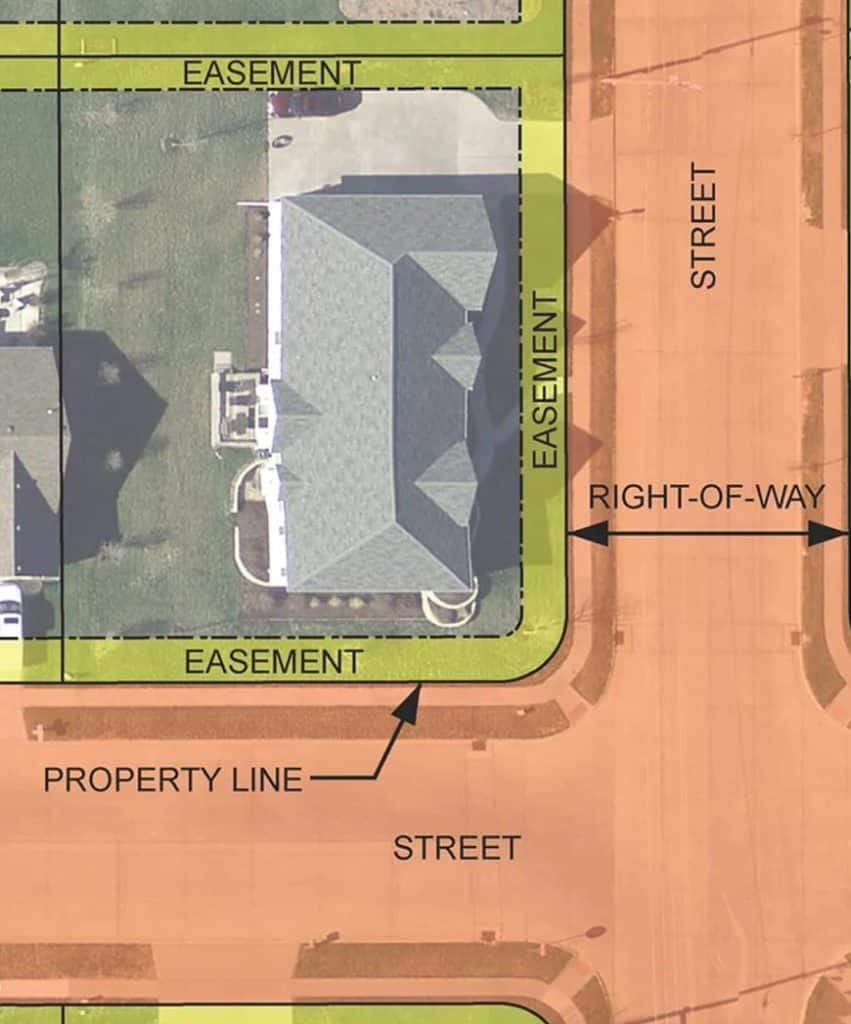
Utility easements allow crews to safely install and maintain fiber infrastructure in designated public utility areas near roads, sidewalks, and property edges.
Before digging begins, underground utilities are identified and marked to protect existing infrastructure and keep construction safe for residents.
Once construction is complete, impacted areas such as grass, sidewalks, and landscaping are restored as quickly and carefully as possible.
COMMUNITY FIRST
Our crews work directly in the communities they serve, bringing local knowledge, responsive communication, and a commitment to professional workmanship throughout every stage of construction.
Residents may receive updates through mailers, signage, and neighborhood notifications before construction begins so communities stay informed about upcoming work and timelines.
Mainstream Fiber Networks is expanding high-speed fiber infrastructure designed to support modern homes, remote work, streaming, smart devices, and future community growth.
Every network expansion project is built to deliver long-term value by improving connectivity, supporting local neighborhoods, and creating more reliable access to modern internet services.
Service Areas
MSFN has the legal right to access the designated utility easements which are typically located within a strip of land running along the street, sidewalk, the rear lot line, or between two lots. If the easement is within a fenced-in yard, our crews will need your help accessing the area. If you have any questions about this or require more information, please contact (844) 752-6736
Markers and paint need to remain in place until construction of the network is complete. Flags can be removed when installation is complete. The paint will eventually wash away or grow out.
Our crews make every effort to minimize impact to properties. Once construction is complete and weather permits, MSFN will restore lawns in areas where digging occurred. If you have any questions, reach out to our team at (844) 752-6736.
Each project is different and the type of construction is based on a number of factors such as size of the project, the geography of your neighborhood, cost to build, etc. However, we generally try to follow the route of other utilities in the area whenever possible, so if your neighborhood’s utilities are primarily underground, we will likely build underground and vice versa.
The time for construction is extremely variable and is based on the size of the project, what type of construction it is, and weather conditions. Due to the variability we do not like to give a “standard timeline” answer as it can change so much, but you and your neighbors will be notified the moment construction is over and fiber is available.
Mainstream is expanding our fiber network to bring high-speed internet to your area. Construction crews are installing underground or aerial fiber lines that will connect homes to our fiber infrastructure.
Possibly. If fiber lines are placed underground, we may need to access a utility easement on your property. These areas are typically near the edge of your yard and are legally designated for utility work. We always do our best to minimize disruption and restore any disturbed areas.
You will receive advance notice via door hangers, signage, or communication from our team. Construction schedules may vary based on weather and local permitting.
Only for the final installation inside your home. This step typically happens after construction is complete and you’ve signed up for service. Our technician will install a fiber terminal and set up your equipment.
We take great care to avoid damage, and any disturbed areas will be restored after construction. Grass may take some time to regrow, but our crews work to ensure proper cleanup and repair.
Make sure someone 18 or older is home. Clear access to your home’s main utility entry point and know where you’d prefer the modem or router to be placed for the best Wi-Fi coverage.
Please inform our team ahead of time. Marking invisible fences or sprinkler systems helps us avoid damage during construction.
Reach out to Mainstream Fiber Networks’ customer support for updates or concerns about construction or installation on your property. We’re here to help, please contact us at (844) 752-6736.
Aerial fiber is installed above ground on utility poles, making it faster and more affordable to deploy, but more exposed to weather and environmental damage. Buried fiber is installed underground in protective conduit, offering greater long-term durability and reliability, though it requires more time and construction to install.
Bandwidth is the amount of data your internet connection can handle at once. Higher bandwidth means your network can support more devices and activities without slowing down.
Download speed measures how fast you can receive data such as streaming videos, loading websites, or downloading files.
Upload speed measures how fast you can send data like video calling, backing up photos, or uploading documents.
Ethernet is a wired connection that offers the fastest and most stable speeds.
Wi-Fi is wireless and more convenient, but can be affected by distance, walls, and interference.
Most devices connect through Wi-Fi by selecting your network name and entering your password. Others like desktop computers, gaming consoles, and smart TVs can optionally connect with an Ethernet cable for improved performance.
Fiber uses light instead of electricity to send data, making it faster, more reliable, and better at handling multiple devices. Cable, DSL, fixed wireless, and satellite often slow down during peak hours or have higher delays.
Use strong passwords, enable two-factor authentication, keep devices updated, and avoid using public Wi-Fi for sensitive tasks. A secure home network starts with a strong Wi-Fi password and trusted devices.
Never click suspicious links, double-check email senders, and be cautious of messages asking for personal or financial information. Legitimate companies won’t pressure you or threaten immediate action.
You can stream movies, shop, work remotely, play games, video chat, manage smart-home devices, learn new skills, and connect with friends and family.
It depends on your household. More people and more devices usually mean you’ll need faster speeds. Activities like gaming, 4K streaming, or remote work also benefit from higher-speed plans.
A speed test measures how fast your internet can download and upload data, as well as your connection’s responsiveness. It helps you understand whether your current speeds match what you’re paying for and if your network can handle the activities, you do online.
Your internet performance can be influenced by several factors, including the number of devices connected, Wi-Fi signal strength, router placement, equipment age, network congestion during peak hours, and whether you’re using Wi-Fi or a wired Ethernet connection.
E-Care is Mainstream Fiber Networks’ online customer portal that allows you to manage your account anytime from anywhere, without needing to call in.
Most routers can be reset by pressing and holding the reset button on the back for 10-15 seconds. This will reboot the device and often fix common connectivity issues. Calix equipment can also be rebooted through the Mainstream Fiber app.
You will connect the router to the modem using an ethernet cable. The ethernet cable will plug into the ETHERNET port on our modem, and to the WAN port of your router.
If you are using a router provided by MSFN our Smart Home Technicians will set the equipment up properly during installation.
All equipment to get the service into your home is provided by and warranted through Mainstream Fiber Networks. However, if you would like additional Wi-Fi coverage or other options, you would need to purchase separate equipment.
Setup typically involves connecting the router to your fiber terminal, powering it on, and following the steps in the Mainstream App to create your Wi-Fi name and password.
A device issue affects only one device and usually involves settings, software, or hardware on that specific phone, tablet, or computer. A network issue affects multiple devices at once and usually points to a router, Wi-Fi, or service connection problem.
Most routers can be reset by pressing and holding the reset button on the back for 10-15 seconds. This will reboot the device and often fix common connectivity issues. Calix equipment can also be rebooted through the Mainstream Fiber app.
You will connect the router to the modem using an ethernet cable. The ethernet cable will plug into the ETHERNET port on our modem, and to the WAN port of your router.
If you are using a router provided by MSFN our Smart Home Technicians will set the equipment up properly during installation.
All equipment to get the service into your home is provided by and warranted through Mainstream Fiber Networks. However, if you would like additional Wi-Fi coverage or other options, you would need to purchase separate equipment.
Setup typically involves connecting the router to your fiber terminal, powering it on, and following the steps in the Mainstream App to create your Wi-Fi name and password.
A device issue affects only one device and usually involves settings, software, or hardware on that specific phone, tablet, or computer. A network issue affects multiple devices at once and usually points to a router, Wi-Fi, or service connection problem.
Get Connected
Fast, reliable fiber is now available in more communities across Indiana.
Check your address and get connected today.